Connect Telegram
The Connect Telegram section is designed to connect the Firedrake Telegram bot, granting access to notifications, monitoring, and trading strategy management directly from your mobile device.
Connecting the Firedrake | Notifications bot is required if you trade with Trade Strategies: a strategy cannot be enabled until the bot is connected. Manual trading, webhooks, and the rest of the platform work without it. In any case, Telegram significantly simplifies account monitoring, especially when there is no access to the web interface.
Why connect Telegram
The Firedrake Telegram bot allows you to:
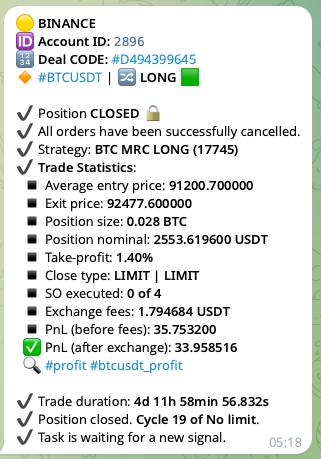
- Receive prompt notifications about trading actions and system events;
- Monitor the status of your futures trading;
- Manage trading strategies and positions directly from Telegram.
Essentially, the Telegram bot provides a fast and convenient way to control the platform in real-time, right from your phone.
Available Functionality
Notifications
After connecting Telegram, you can receive:
- Notifications about actions on Futures (configured in the Futures section);
- System notifications (opening and closing positions, TP/SL execution, and other events);
- A notice that an account has been disabled because the exchange no longer accepts its API keys. The message names the reason and explains how to fix it. It always arrives while Telegram is connected and does not depend on your notification settings — see Connecting an Exchange Account.
Futures
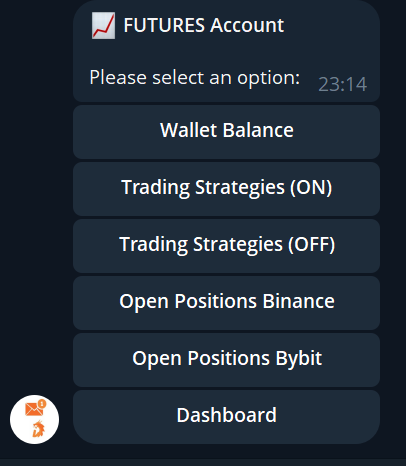
In the Futures section of the bot menu, you can access:
- Balance view of connected futures accounts;
- List of enabled strategies with the ability to disable a strategy directly from the bot;
- List of disabled strategies with the ability to enable them back.
This is especially convenient if you need to urgently stop or activate a strategy without access to a computer.
Additionally, from the Telegram bot you can:
- View open positions on Binance and Bybit;
- Receive futures statistics for the last 6, 12, or 24 hours, 3 or 7 days, or for Today / Yesterday — calendar days in the time zone of your profile;
- View details of open positions;
- Manually close positions directly from the bot.
How to connect Telegram
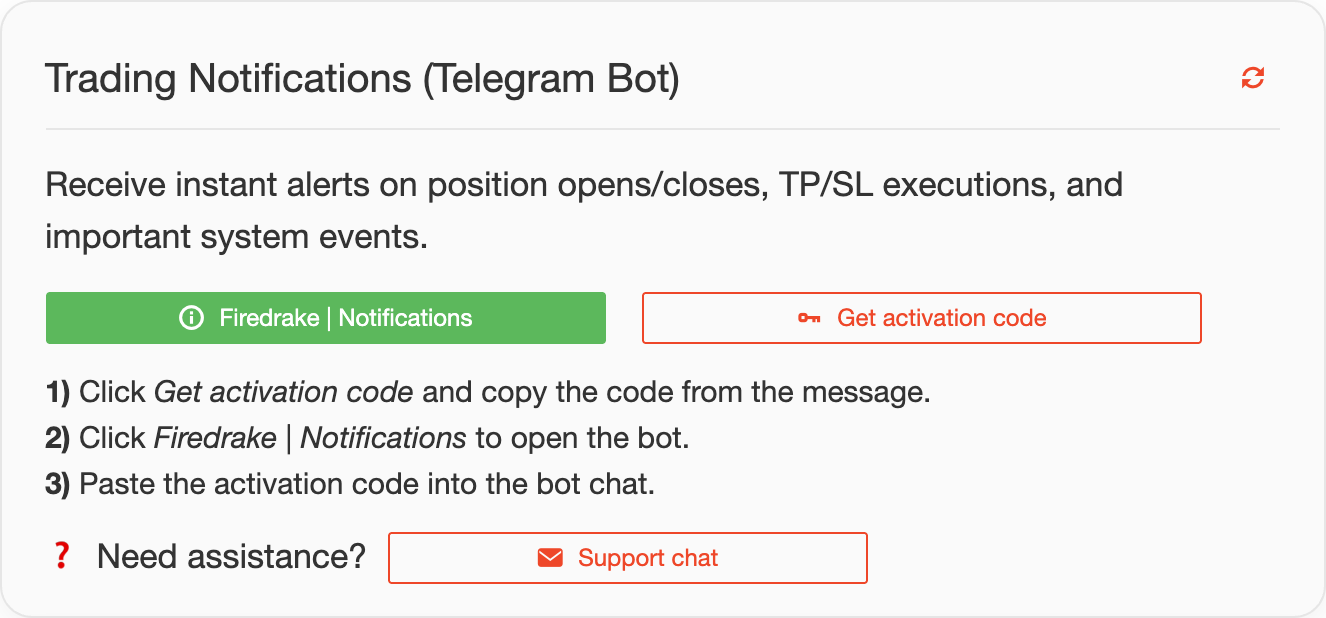
To link your Telegram account to the platform, follow these steps:
- Click Get activation code and copy the code from the message.
- Click Firedrake | Notifications to open the Telegram bot.
- Paste the copied code into the chat with the bot.
After this, Telegram will be linked to your profile, and the functionality will become automatically available.
Additional Telegram Resources
The Connect Telegram section also provides links to additional Firedrake Telegram resources:
Insights (Bot and Group)
Insights Bot — provides analytical data and market reports available in the terminal:
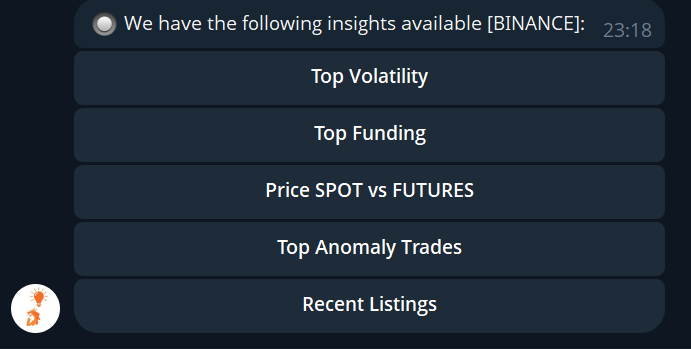
- High volatility;
- Funding rates;
- Spot vs Futures divergences (only liquid spot markets);
- Abnormal trades;
- New listings.
Insights Group — a channel with push notifications about notable market events on Binance and Bybit:
- Spot/futures price spread — an unusually large gap between the spot and futures price of a pair combined with high funding. Only spot markets with at least $50k of turnover over the last 24 hours are considered. While the spread persists, the signal is repeated.
- Anomalous funding — a funding rate of 0.5% or more (in absolute value) shortly before the funding cutoff, in separate topics for Binance and Bybit.
- New listings — new futures pairs on both exchanges, including a pair returning after a delisting. Spot listings are not posted.
- Delistings — futures pairs scheduled for delisting, with the date and the number of days left.
The channel is informational: it does not open trades and is not a trading recommendation.
Community
Firedrake | Community (Ru) — the Telegram channel for following platform updates, releases, and announcements.
Users share experiences, observations, and ideas for improving the platform.
Support
Firedrake has no support in Telegram. The only way to contact support is the chat on the platform: the Support item in the main menu opens the chat window. The Support chat button next to Need assistance? in the Telegram notifications block opens the same chat. In the mobile interface, use Support chat on the Home screen.
Summary
Connecting Telegram allows you to:
- Control Futures without access to the web interface;
- Receive important notifications in real-time;
- Promptly manage strategies and positions;
- Use analytics and signals directly from Telegram.